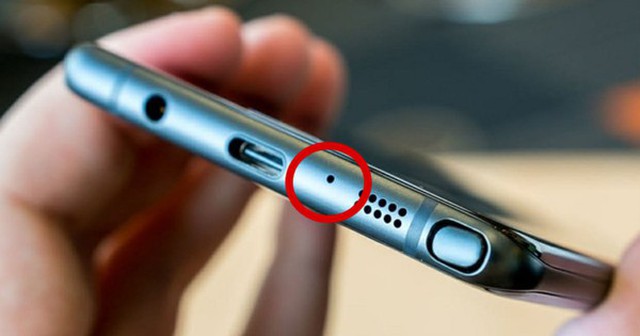
The Tiny Hole on Your Phone: A Small Detail That Makes a Big Difference
Most smartphone users have noticed a tiny hole located near the charging port or on the top edge of their device. Many assume it’s a SIM eject hole or even a reset pinhole—but in reality, it serves a far more important purpose.
According to tech experts, this small opening is actually a secondary microphone, an essential part of modern smartphones’ dual- or multi-microphone systems.
What does it actually do?
Unlike the main microphone, which captures your voice during calls, the secondary microphone is designed to pick up ambient noise—such as wind, traffic, or background chatter.
Your phone then uses noise-cancellation technology to filter out these unwanted sounds, making your voice clearer on calls and recordings.
Why is it placed there?
The location isn’t random. Manufacturers carefully position this microphone to:
-
Capture environmental noise effectively
-
Avoid interference with your voice
-
Optimize internal hardware design
Many smartphones even include additional microphones near the camera or on the top edge to enhance audio quality for videos and voice commands.
Small but powerful
This tiny component plays a big role in several features:
-
Call clarity
-
Video and audio recording
-
Voice assistants (like Siri or Google Assistant)
-
Noise cancellation
If it gets blocked or damaged, you may notice muffled sound, poor call quality, or recording issues.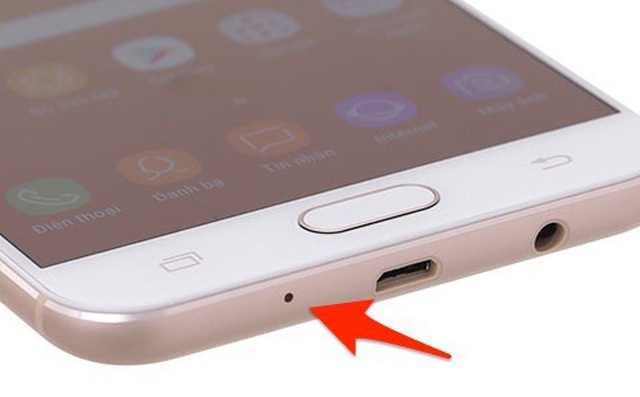
A common mistake to avoid
One of the most frequent user errors is mistaking this hole for the SIM tray eject point and inserting a pin into it. This can damage the microphone and lead to costly repairs.
Dust buildup can also affect performance if not cleaned properly.
How to protect it
-
Never insert sharp objects into the hole
-
Keep it clean and dust-free
-
Make sure your phone case doesn’t block it
-
Avoid exposure to water