If your Wi-Fi signal seems weak in certain parts of your home, you may have come across a surprisingly simple suggestion: place a sheet of aluminum foil behind your router.
It sounds almost too easy to be true.
Why would something as ordinary as kitchen foil have anything to do with Wi-Fi?
The answer involves a little bit of radio physics. Aluminum can interact with electromagnetic waves, including the radio-frequency signals used by Wi-Fi. When positioned carefully, a piece of conductive material can reflect and redirect some of the wireless energy produced by an antenna.
But there is an important catch.
Aluminum foil isn't a magical Wi-Fi booster, and simply wrapping your router in foil could actually make the signal worse. The potential benefit comes from using the material as a reflector, not as a blanket around the router.
Let's look at what this popular household trick can—and can't—do.
How Does a Wi-Fi Router Actually Send a Signal?
Your router communicates with phones, laptops, televisions, smart-home devices, and other equipment using radio waves.
Depending on the router and wireless standard, Wi-Fi operates on frequencies such as 2.4 GHz, 5 GHz, and 6 GHz.
These radio waves spread through your home, but they don't necessarily travel in a perfectly uniform way.
Walls, furniture, appliances, floors, ceilings, and other objects can absorb, reflect, scatter, or otherwise affect the signal.
That's why you might have excellent Wi-Fi next to your router but noticeably weaker performance in a bedroom, upstairs room, or outdoor area.
The physical layout of your home matters.
And that's where the idea of using aluminum foil comes in.
Why Can Aluminum Foil Affect Wi-Fi?
Aluminum is electrically conductive.
When electromagnetic waves encounter a conductive surface, some of their energy can be reflected.
This principle is already used in many technologies involving radio-frequency signals.
A carefully shaped metal reflector can therefore influence where wireless energy is concentrated.
Think of it somewhat like placing a reflector behind a flashlight.
The reflector doesn't create more light.
Instead, it can alter the direction in which some of the light travels.
A properly positioned Wi-Fi reflector can work on a similar basic principle.
The Goal Isn't to Wrap the Router
This is probably the most important thing to understand.
Do not completely wrap your Wi-Fi router in aluminum foil.
Doing so can interfere with the antennas and block or distort radio-frequency signals.
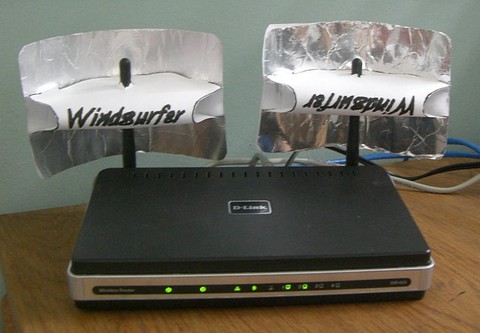
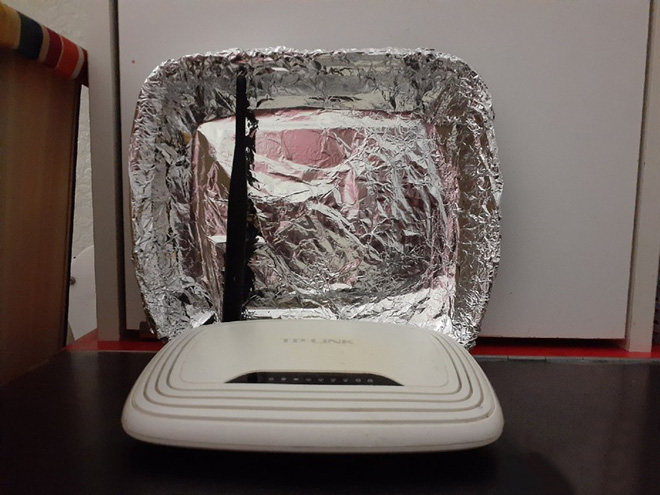
Instead, the idea behind the foil trick is to position a conductive surface behind the antenna or router so that some of the signal is reflected toward the area where you want coverage.
In other words:
You're trying to redirect the signal—not trap it.
The exact result depends heavily on the router's antenna configuration, the foil's shape and position, and the layout of the room.
Could It Actually Improve Wi-Fi?
Potentially, yes—but the effect is highly dependent on circumstances.
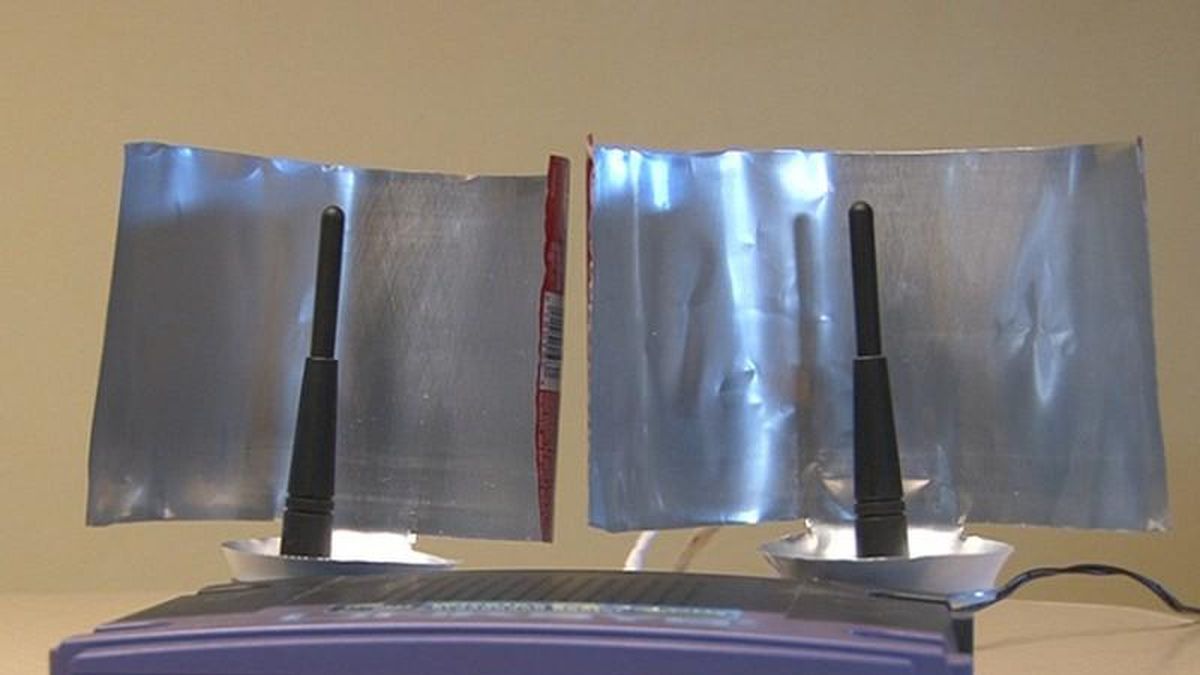
Experiments involving shaped metallic reflectors have demonstrated that they can alter the propagation of Wi-Fi signals and, under some conditions, improve signal strength in a desired direction.
However, this doesn't mean your entire home will suddenly receive dramatically faster internet.
There is a major difference between:
Signal strength
and
Internet speed.
Your internet connection is also affected by your broadband service, router performance, congestion, interference, device capabilities, network traffic, and many other factors.
A reflector might improve reception in one area while reducing it somewhere else.
That's because you're changing the distribution of the wireless signal rather than generating additional network capacity.
Why the Shape of the Foil Matters
Simply placing a flat sheet of aluminum behind a router isn't necessarily the most effective configuration.
A curved reflector can redirect radio waves differently from a flat surface.
Researchers have experimented with 3D-printed and metallic reflector designs that can be shaped to influence wireless coverage.
The concept is relatively simple:
The reflector is positioned so that unwanted signal radiation can be redirected toward a target area.
But household Wi-Fi environments are complicated.
Signals bounce off walls and objects, and multiple antennas may transmit simultaneously.
That's why a homemade reflector can produce different results in different homes.
Your Router's Antenna Design Matters
Modern routers aren't all built the same way.
Some have visible external antennas.
Others have antennas hidden inside the housing.
Many modern systems use multiple antennas and technologies such as MIMO, which allows several spatial signal paths to be used simultaneously.
Because of this, placing foil behind an entire router may not behave the same way as putting a reflector behind a simple directional antenna.
If your router has internal antennas, the exact orientation and location of those antennas may be difficult to determine.
That makes the household foil experiment much less predictable.
What You Might Notice If It Works
If the reflector happens to improve coverage in the direction you need, you might notice:
-
A stronger Wi-Fi signal in a particular room
-
Fewer connection drops
-
More reliable streaming
-
Better performance at the edge of your Wi-Fi coverage
-
Improved reception in a specific area
But don't expect a miracle.
A small change may be difficult to notice during normal browsing.
And because Wi-Fi conditions constantly change, a one-time test isn't always enough to determine whether the modification helped.
It Could Also Make Things Worse
This is something viral posts often leave out.
Because metal reflects and interferes with radio waves, a poorly positioned piece of foil could reduce signal quality in certain areas.
You might improve coverage in your kitchen while making the signal weaker in your living room.
Or you might create additional reflections that make the connection less predictable.
Wi-Fi signals already experience multipath propagation, meaning signals can reach a device through multiple paths after reflecting off surfaces.
Changing one part of that environment can therefore produce unexpected results.
So if you experiment with foil, test the connection afterward rather than assuming it worked.
Placement Is More Important Than the Material Alone
Where your router sits usually matters far more than whether you have a piece of aluminum foil nearby.
For example, placing a router:
High up
Near the center of the home
Away from large obstructions
Away from enclosed cabinets
Away from major sources of interference
can often make a meaningful difference.
A router hidden behind a television, inside a cabinet, or on the floor may have poor coverage regardless of whether you add a reflector.
Before trying unusual hacks, optimizing router placement is usually the more sensible first step.
Keep the Router Away From Certain Obstacles
Some materials and objects can interfere with wireless signals more than others.
Large metal surfaces can be particularly problematic.
Thick walls, concrete, certain building materials, and large appliances can also affect propagation.
Water absorbs radio-frequency energy, which is one reason areas containing large amounts of water can influence wireless transmission.
That doesn't mean your refrigerator will completely destroy your Wi-Fi.
It simply means the physical environment matters.
What About Putting Foil Around the Antennas?
This is where caution is especially important.
The antenna is responsible for transmitting and receiving radio-frequency energy.
Covering or surrounding it with metal can significantly alter its radiation pattern.
You could unintentionally block or distort the signal.
If you're going to experiment, a separate reflector positioned behind the antenna is conceptually much safer than wrapping the router or antenna itself.
And you should never obstruct the router's ventilation openings.
Routers generate heat during operation and need adequate airflow.
Don't Expect More Internet Bandwidth
This distinction is crucial.
Suppose your internet plan provides a certain maximum download speed.
Adding foil behind the router doesn't increase the bandwidth supplied by your internet service provider.
What it might potentially do is help your device receive a stronger or more favorable wireless signal.
That's useful when Wi-Fi coverage is the bottleneck.
But if your ISP connection is already the limiting factor, a reflector won't magically turn a slower connection into a faster one.
Try a Simple Before-and-After Test
If you're curious about the trick, you can test it rather than relying on internet claims.
First, measure your Wi-Fi performance in the room where you're having problems.
You can check:
-
Signal strength
-
Download speed
-
Upload speed
-
Latency
-
Connection stability
Then make one change at a time.
Position the reflector behind the router or relevant antenna and repeat the measurements from the same location.
If performance improves consistently, you've learned something useful about your particular setup.
If it gets worse, simply remove the reflector.
This approach is much better than assuming that every home will experience the same result.
What Should You Try Before Aluminum Foil?
There are several more reliable ways to improve Wi-Fi coverage.
1. Reposition the router
Try placing it in a relatively central, elevated location.
2. Reduce obstructions
Avoid hiding it inside furniture or behind large objects.
3. Update the router
Older hardware may have limitations that newer models can address.
4. Choose an appropriate Wi-Fi band
The 2.4 GHz band generally travels farther and penetrates obstacles better, while 5 GHz and 6 GHz can offer higher performance at shorter ranges under suitable conditions.
5. Consider a mesh system
For larger homes or properties with difficult layouts, a properly configured mesh network can provide much more consistent coverage.
6. Use wired Ethernet when possible
For stationary devices such as desktop computers, game consoles, or smart TVs, Ethernet can provide a more stable connection than Wi-Fi.
Is Aluminum Foil Safe Near a Router?
A loose piece of aluminum foil placed near a router isn't inherently dangerous simply because the router uses radio waves.
However, you should avoid placing foil where it can:
-
Block ventilation
-
Contact electrical connections
-
Touch exposed circuitry
-
Fall into the router
-
Cause overheating
-
Interfere with cables or ports
And don't attempt to modify the router's internal components.
A simple external experiment is one thing.
Opening or physically altering networking equipment is another.
The Bigger Lesson Behind the Viral Trick
The interesting thing about the aluminum-foil router trick isn't really the foil itself.
It's the principle behind it.
Wireless signals aren't invisible magic.
They're electromagnetic waves governed by physical properties.
They can reflect.
They can scatter.
They can be absorbed.
They can interfere with one another.
And their behavior can be influenced by the environment around an antenna.
Once you understand that, the idea of using a reflector doesn't seem quite so strange.
Why One Home May See a Benefit and Another May Not
Your home is essentially a unique radio environment.
The router model is different.
The antenna arrangement is different.
The walls are different.
The furniture is different.
Your neighboring networks are different.
Even the position of your phone or laptop can affect the result.
This is why internet hacks that promise a guaranteed improvement should be viewed cautiously.
A technique that produces a measurable difference in one experimental setup may have little effect—or even a negative effect—in another.
Final Thoughts
So, should you put aluminum foil behind your router?
You can experiment with a carefully positioned reflector, but don't expect it to act like a magical Wi-Fi amplifier.
Aluminum is conductive and can reflect electromagnetic waves, meaning a properly positioned reflector can potentially redirect some wireless energy toward a desired area.
However, the effect depends on the router, antenna design, reflector shape, placement, room layout, and surrounding environment.
The simplest approach is to treat it as a small experiment.
Don't wrap the router in foil. Don't block its ventilation. Don't cover the antennas indiscriminately.
Instead, optimize the router's location first, then test whether a reflector makes any measurable difference.
And if you're dealing with serious Wi-Fi dead zones, a better router, access point, mesh system, or wired connection will usually be a more dependable solution.
Sometimes a piece of kitchen foil really can influence a wireless signal—but the physics behind the trick is much more interesting than the viral claim that foil can magically “boost” your internet.