You are scrolling through social media, checking messages, reading the news, or simply looking at your phone when something unusual catches your attention.
A tiny green dot has appeared near the top of your screen.
At first, you might not think much of it. Perhaps it is part of a new software update. Maybe it is just another notification symbol. You continue using your phone, open another application, and eventually forget that it was there.
But what if that small green dot is actually telling you that an application is accessing your camera or microphone?
Modern smartphones contain powerful privacy features designed to make it easier for users to understand when certain hardware components are being used. Among the most important are the small colored indicators that appear when an application accesses sensitive functions such as the camera or microphone.
These indicators are designed to be noticeable without interrupting whatever you are doing.
On many Android phones, a green privacy indicator appears when an application is using the camera or microphone. On iPhones, a green indicator generally means that the camera is being used, either alone or together with the microphone. An orange indicator on an iPhone signals microphone access without camera access.
The purpose is simple: your phone should not silently allow applications to access these sensitive features without giving you a visible indication.
However, seeing the green dot can raise an important question.
What application is using your camera? Did you accidentally grant permission to something you rarely use? Is an application recording audio or accessing the camera in the background? And what should you do if the indicator appears when you are not taking pictures, recording videos, or making a call?
The answer is not necessarily that your phone has been hacked.
There are many legitimate reasons why the indicator may appear. A video call, voice-controlled assistant, camera application, social media platform, or messaging service may temporarily access your device's hardware.
Still, an application that accesses your camera or microphone without an obvious reason deserves your attention.
The good news is that both Android and iPhone provide tools that allow you to investigate which applications have recently accessed these features. You can review permissions, revoke access, and make changes that give you greater control over your privacy.
In this guide, we will explain exactly what the green dot means, why it appears, how to identify the application responsible, and what steps you should take if something seems unusual.
Because that tiny indicator is more than just another symbol on your screen.
It is one of the simplest ways your smartphone helps you understand what is happening behind the scenes.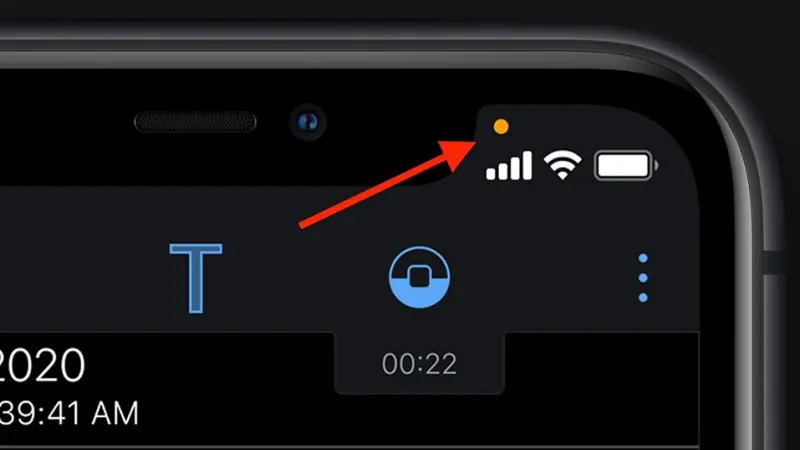
CHAPTER 1: WHAT DOES THE GREEN DOT ON YOUR PHONE ACTUALLY MEAN?
The first thing you should know is that the green dot is generally a privacy indicator, not an ordinary notification.
It is designed to alert you when an application is accessing sensitive hardware, particularly your camera or microphone.
This matters because these components can reveal much more about your personal life than many people realize.
Your camera can capture images of your surroundings, your home, your workplace, and the people nearby. Your microphone can pick up conversations, background sounds, and other audio within its range.
When an application accesses either of these features, it is important for you to know that the access is taking place.
That is exactly why smartphone manufacturers introduced visible privacy indicators.
What does the green dot mean on Android?
On Android devices running Android 12 or later, a privacy indicator appears when an application uses the camera or microphone.
The indicator is generally displayed as a small green symbol near the upper-right area of the screen, although its exact appearance and location may vary depending on the manufacturer and software version.
For example, if you open your camera application, the green indicator may appear because the camera is actively being used.
If you start a video call, the application may access both the camera and microphone. The privacy indicator can then alert you that one or both of these components are active.
The important feature is that Android allows you to investigate which application is responsible.
On many Android devices, you can swipe down from the top of the screen to open the notification shade or Quick Settings panel. Tapping the privacy indicator or the relevant camera and microphone notification can reveal which application is accessing the hardware.
Some manufacturers customize this experience, so the exact steps may differ between Samsung, Google Pixel, Xiaomi, Motorola, and other Android phones.
What does the green dot mean on an iPhone?
Apple also introduced privacy indicators to help users understand when applications access sensitive hardware.
On an iPhone running a supported version of iOS, a green dot appears when an application is using the camera.
If the camera and microphone are being used together, the green indicator may also appear.