More Than 90% of iPhone Users Don’t Know the Purpose of the Tiny Hole Next to the Camera
If you take a close look at the back of your iPhone, you’ll notice a small pin-sized hole near the camera module. Many users assume it’s part of the camera system—or worse, mistake it for a reset hole. In reality, this tiny detail plays a critical role in call quality, video recording, and noise control.
So What Is That Small Hole?
That tiny hole is actually a secondary microphone, often referred to as the noise-cancellation microphone.
Apple equips iPhones with multiple microphones, not just one. While the primary microphone captures your voice, this secondary microphone:
-
Detects background noise
-
Filters out unwanted sounds
-
Helps the phone distinguish your voice from ambient noise
The result is clearer calls, better video audio, and improved voice recordings.
Why Is It Important?
This microphone is actively used when:
-
Making phone or FaceTime calls
-
Recording videos
-
Using speakerphone
-
Activating Siri
-
Recording voice notes
If the hole is blocked by dust, dirt, or a thick phone case, users may experience:
-
Muffled or unclear call audio
-
Poor video sound quality
-
Siri failing to recognize commands properly
Many people blame software bugs—when the real issue is a blocked microphone.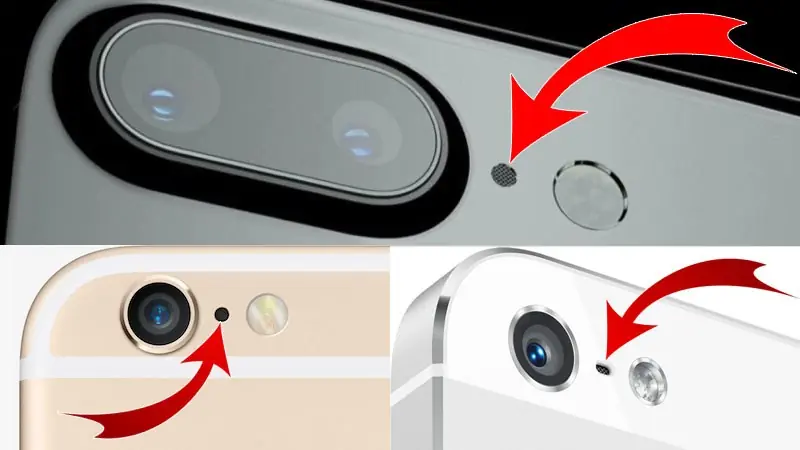
A Common Mistake Many Users Make
Some users accidentally poke the hole with sharp objects, thinking it’s a SIM reset or eject port. This can permanently damage the microphone and affect audio performance.
Apple technicians warn:
-
Never insert needles, pins, or metal objects
-
Clean gently with a soft brush or compressed air only
How to Take Care of It
To keep your iPhone’s audio quality optimal:
-
Use phone cases that don’t block microphone openings
-
Clean dust regularly
-
Avoid exposing the phone to sand or debris
A tiny hole, but a huge impact on daily use.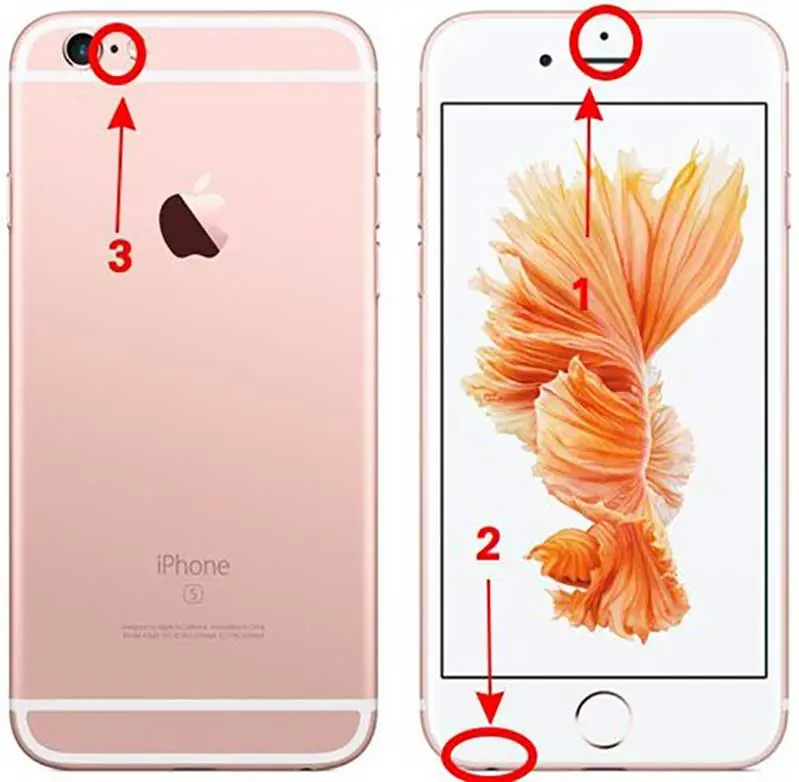
The Bottom Line
That small hole next to your iPhone camera is not decorative—it’s a key component that ensures clear sound and smooth communication. Knowing this simple detail can help you avoid unnecessary repairs and enjoy better performance from your device.
Sometimes, the most important features are the ones we barely notice.